

The AI revolution isn’t on its way—it’s already storming the gates, and Claude Projects is the weapon of choice if you’re serious about dominating this new business era. While most people are still dabbling with ChatGPT (and custom GPTs), you’re about to unlock a tool that’s significantly more useful—a powerhouse designed for those who think big, push boundaries, and want to use top-tier AI tools.
We’re diving into Claude Projects—an AI assistant that outperforms custom GPTs in crucial ways. It excels at understanding your specific needs by analyzing documents you upload, allowing it to tackle complex tasks with deep context. This leads to highly personalized, relevant solutions. Plus, Claude Projects effortlessly facilitates team collaboration when needed.
If you’re ready to stop tinkering and start transforming your approach, this guide is your entry point to the future of AI Assistants and explosive productivity.
Why Claude Projects? — Its a PowerhouseClaude Projects isn’t just another AI tool; it’s what you need when the stakes are high, the tasks are complex, and you’re aiming for more than just simple prompts or incremental gains. Let’s break down the features that make Claude Projects the real deal:
Massive Context Window: With a 200,000-token capacity, (around 500 pages of text), Claude can handle large projects, detailed analyses, and nuanced conversations that would overwhelm most GPTs. This isn’t about short bursts of brilliance; it’s about sustained, strategic thinking that goes beyond what custom GPTs or other AI tools on the market can handle.Domain-Specific Knowledge: Claude Projects lets you feed it documents, code, and data, transforming it into a custom expert in your field. It goes beyond answering questions—it dives deep into your niche, delivering answers with precision. This knowledge integration surpasses typical custom GPTs, allowing Claude to leverage specific information in its responses and analysis, creating a truly personalized AI experience.
Pinpoint Customization: Custom GPTs give you some flexibility, but Claude Projects hands you the keys to a fully tailored AI that molds itself to your needs. It’s like having a top-tier strategist, operations guru, and business mentor wrapped into one digital brain. Each project can be fine-tuned with specific guidelines, ensuring Claude’s outputs align perfectly with your needs. This level of customization allows you to shape Claude into the perfect AI assistant for your unique requirements.
Feature Comparison:
Feature
Claude Projects
Custom GPTs
Other AI Tools
Context Window Capacity
200,000 tokens
8,000-32,000 tokens
8,000-32,000 tokens
Domain-Specific Knowledge
Dynamic and Updatable
Limited
Limited
Team Collaboration
Seamless
Limited
Basic
Artifact Creation
Built-in
Not available
Not available
Seamless Team Collaboration: Whether you’re solo or working with a team, Claude’s ability to integrate with group dynamics sets it apart. Collaboration isn’t just a feature—it’s a built-in superpower. For users on Team plans, projects can be shared (and individual chats with a project too), enabling seamless cooperation and knowledge sharing among team members.
Artifact Creation: Claude Projects excels at generating polished deliverables—code snippets, documents, and more—directly within your workspace. It’s not just an assistant; it’s a creative partner that helps you produce work that’s ready to ship.
How to Set Up Claude Projects: A Crash CourseGetting started with Claude Projects is like opening a high-tech treasure chest—everything is intuitive, yet packed with capabilities. Here’s a quick-start guide:
You’ll need a Pro or Team account to access Projects:
Once you’re set up, here’s how to begin:
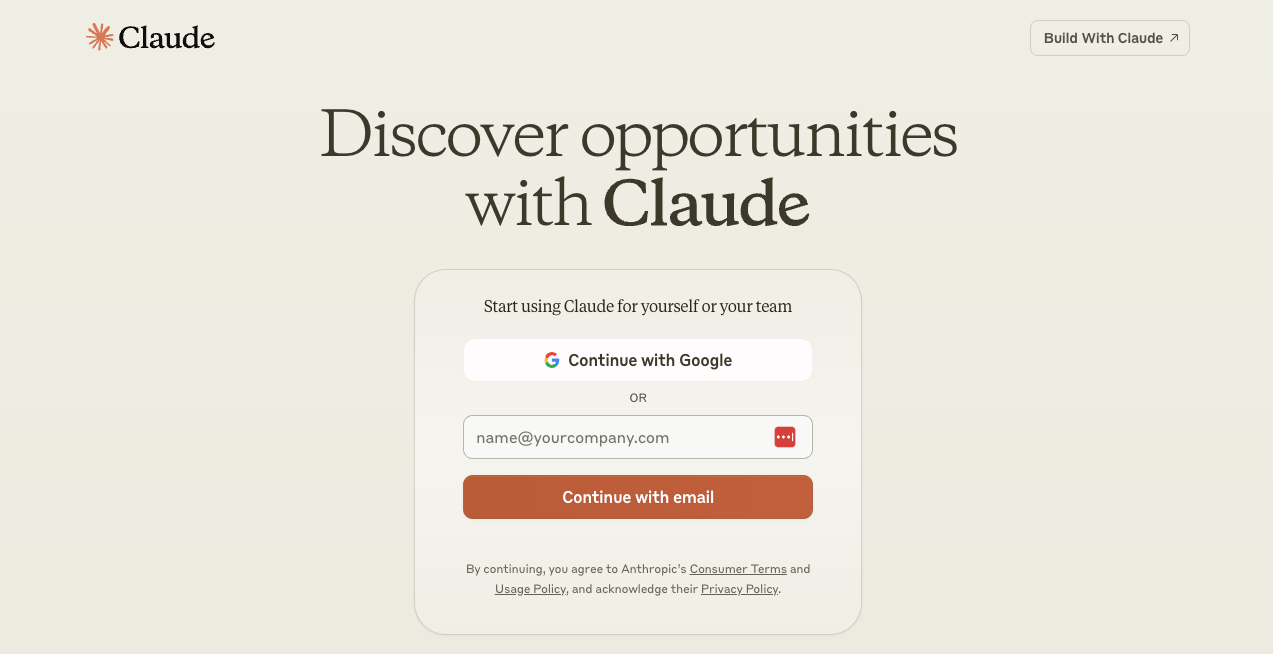
1) Account Creation: Sign up on Anthropic’s platform and choose the subscription that suits your ambition. You’ll need to provide basic information and select a plan that fits your needs.
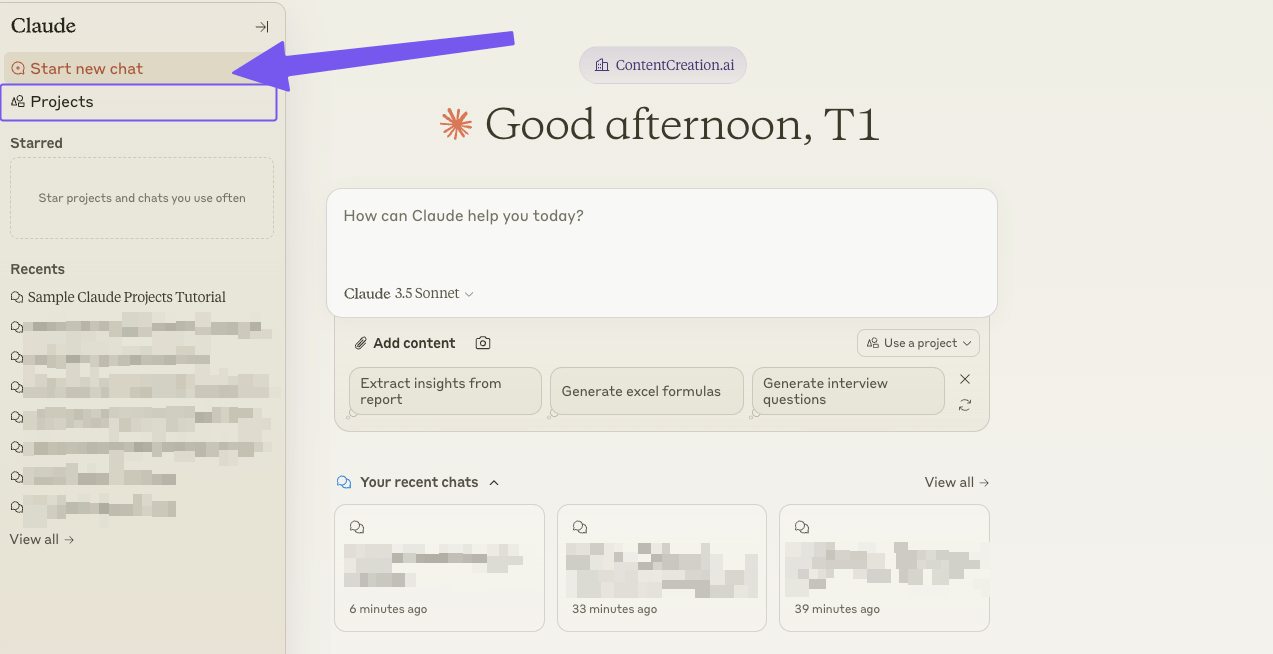
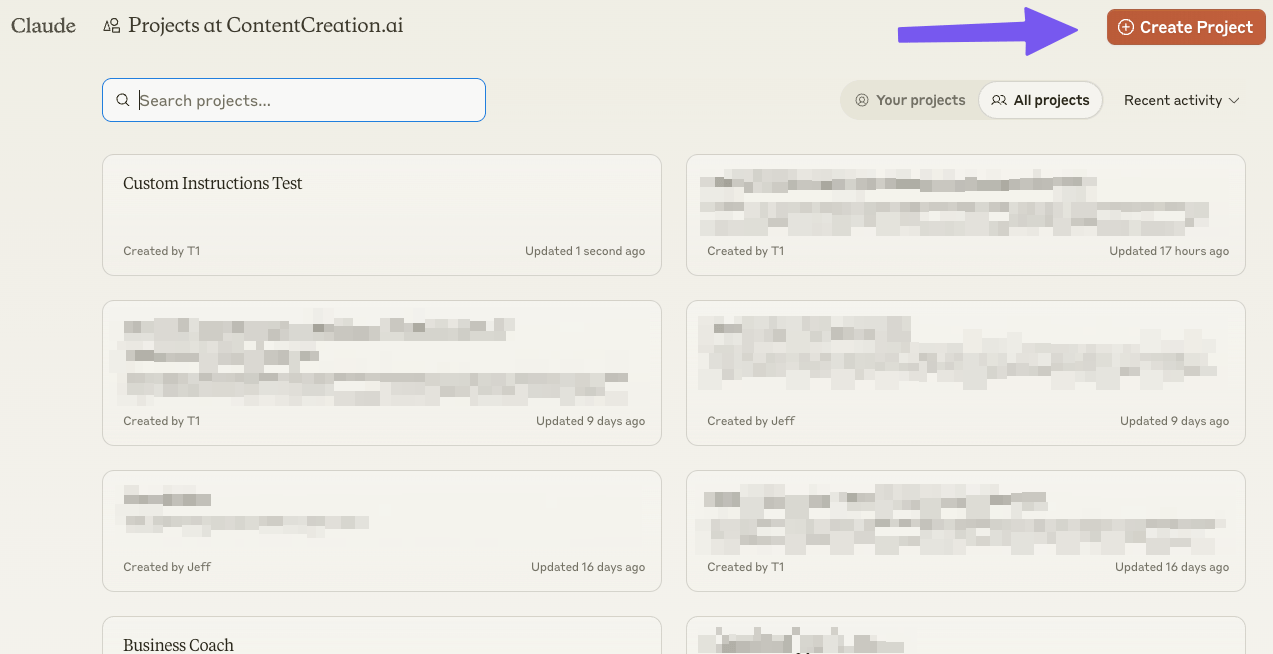
 2) Project Kickoff: Fire up your Claude dashboard, hover over the upper left, and hit “New Project.” You’re prompted to give it a name, description, sharing preferences, and start building your AI kingdom. (Note: I have a team account, so my screenshots may be slightly different if you are on the single person Pro Account)
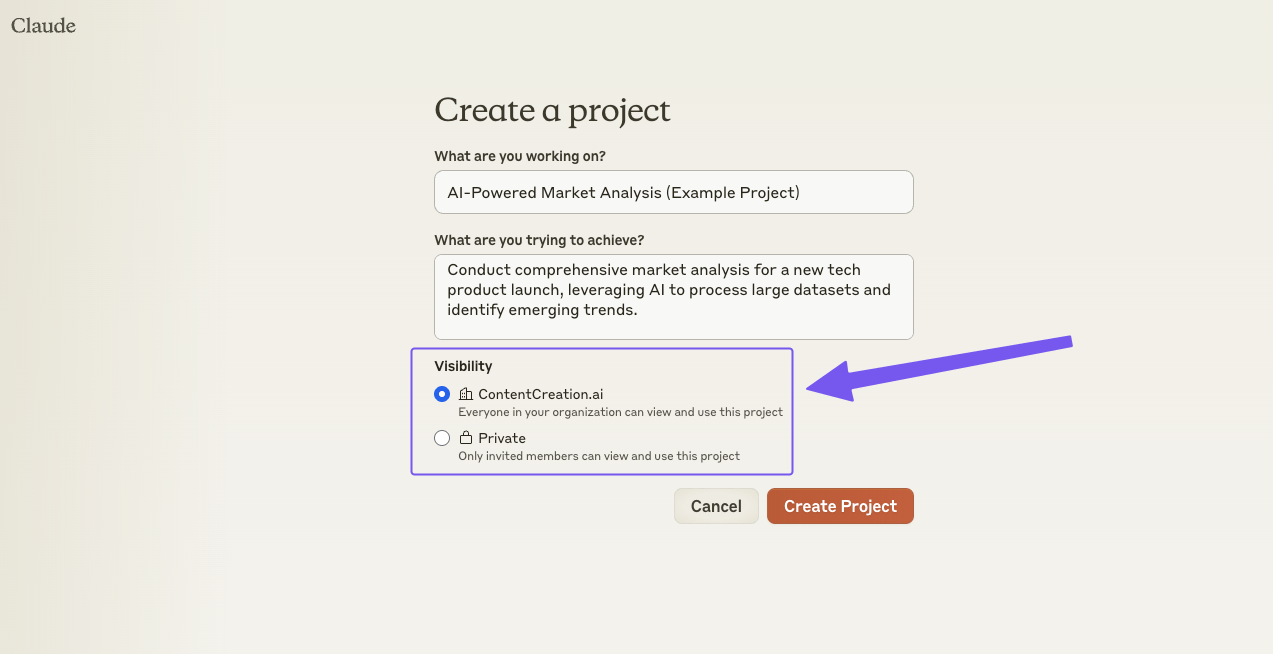 (Only click private if you don’t want to share with your team. However if you only want to share with specific team members, click private and you can add specific team members later.)3) Upload Your Knowledge Base: Dump in all the documents, data, and code that matter to your project. Claude’s not just good at managing this—it thrives on it. Use the “Upload” feature to add files, ensuring they are in compatible formats. (e.g., PDF, TXT, CSV, JSON).
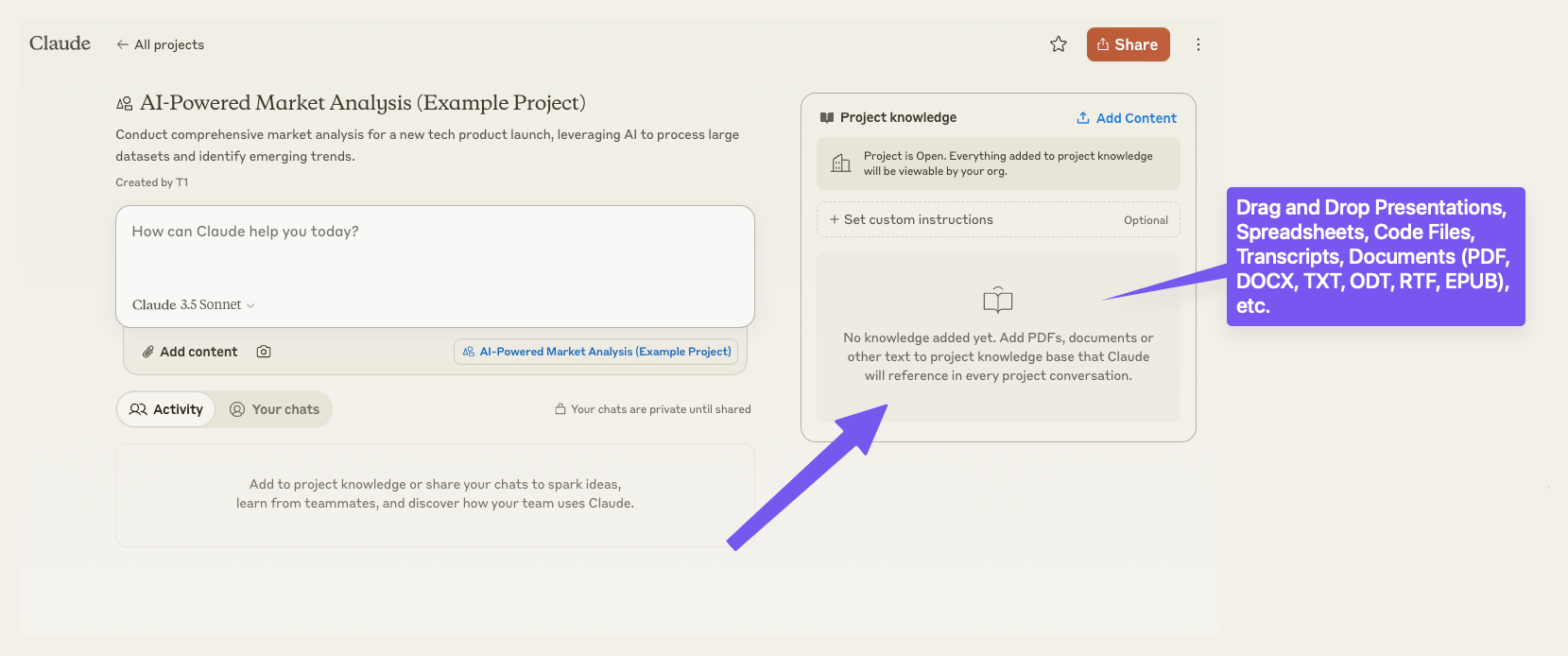 Tip #1: If you have content that Claude creates, you can actually click to add to the project you are working in. Note that you can only do this if the content was created with an artifact. Keep in mind that there is a drawback, you can’t easily bulk download these documents to edit. You CAN have claude output the content, but its less than ideal.
Tip #2: Similarly, if you don’t want to create a word doc, markdown, or other text file to add some info and want to just add something super quickly, click on the ‘Add Content’ button. This has the same drawback of not being able to easily edit the document.
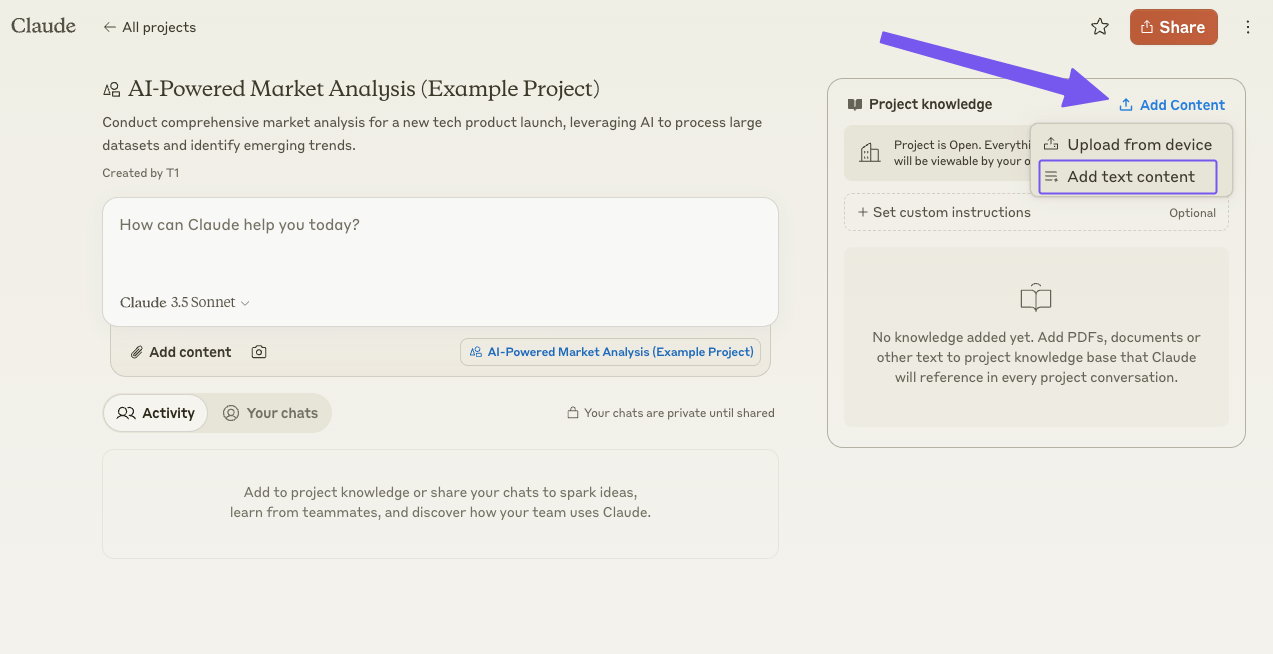
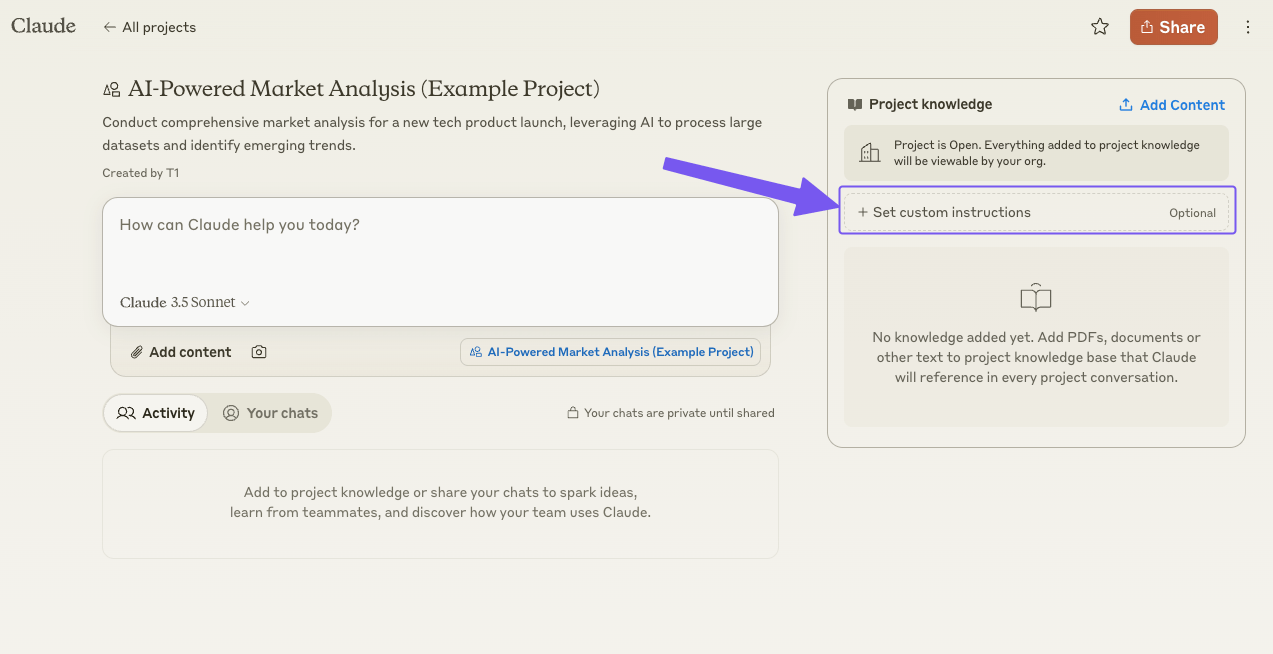
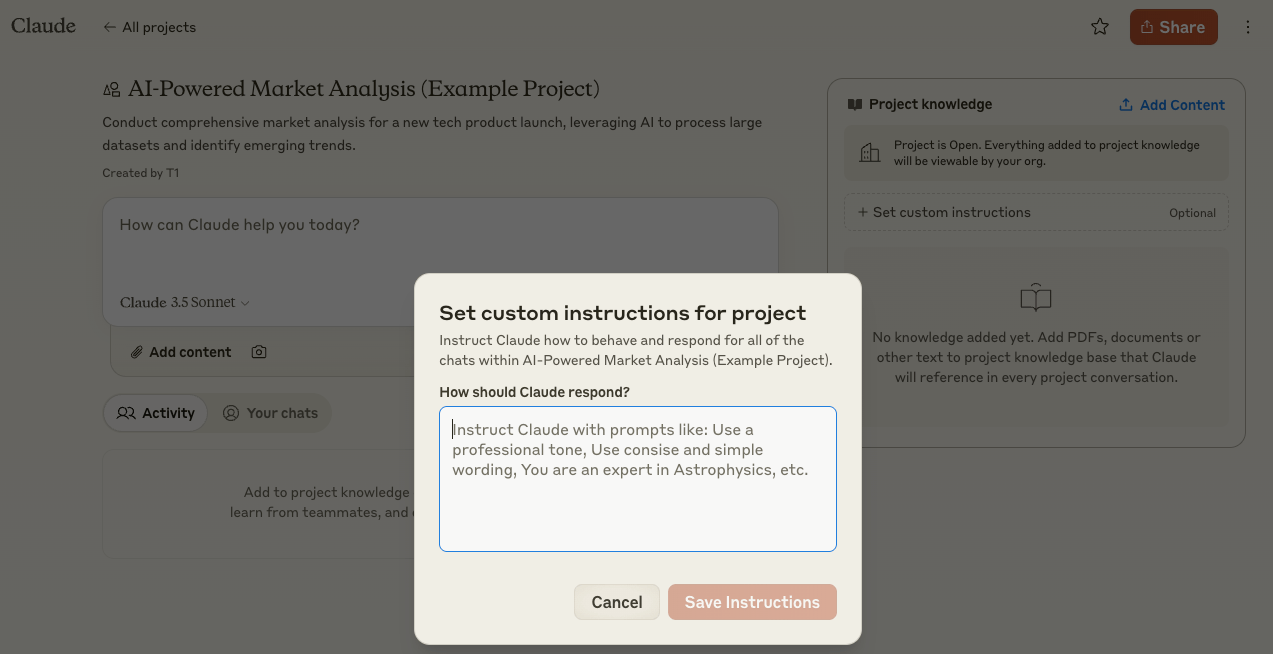
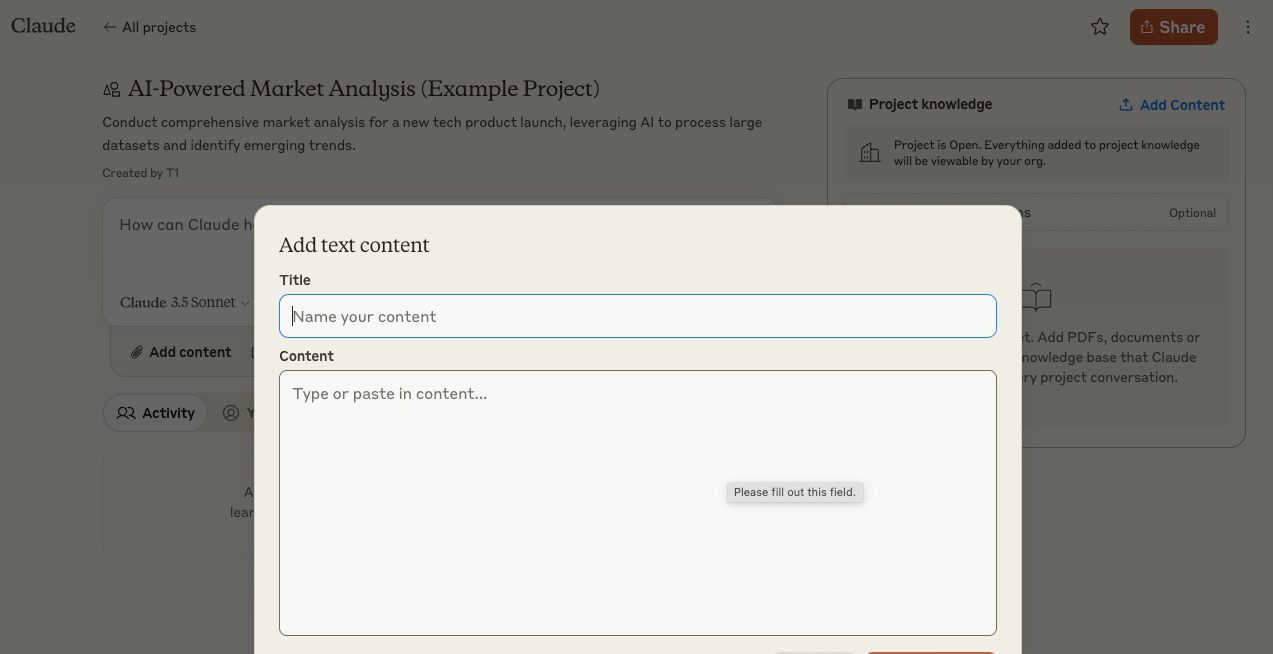 4) Set Custom Instructions: Customize Your Instructions: This is where you really shape Claude to suit your needs. Tweak its tone, specify rules, and refine how it should handle tasks. Navigate to the “Set custom instructions” button to set up guidelines for Claude, specifying output formats, tone, or any specific rules you want it to follow within this project.
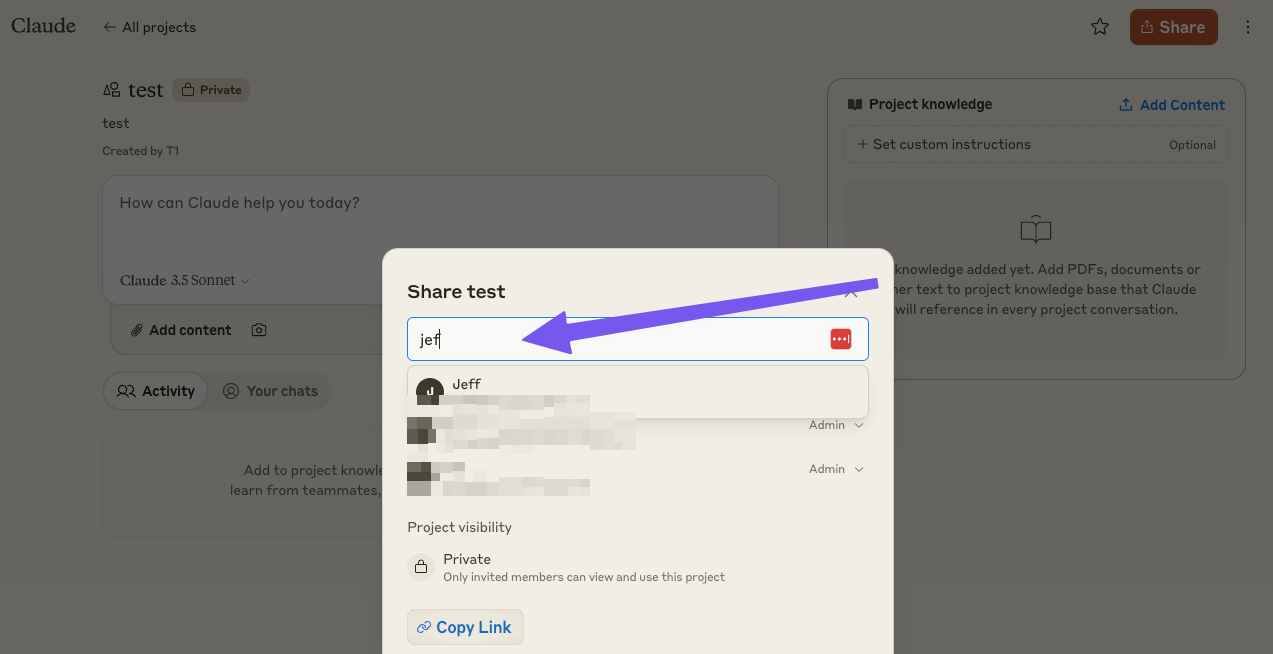
 5) Team Up: For Team plan accounts, If you only want to share with specific team members, or if you accidentally clicked on “Private” from step 1, you can still add specific team members. Just click the “Share” button in the top right and then add team members emails.
In the Project Activity Feed section, there are separate views for ‘Your projects’, ‘All projects’, and a ‘Recent activity’. The Recent activity feed, also known as the (project activity feed), displays all shared content and updates, allowing team members to stay informed about recent updates, contributions and project progress at a glance. It’s a great way to keep everyone on the same page as your projects move forward.
 6) Artifacts & Outputs: Explore the “Artifacts” feature—where Claude stores and outputs everything from charts to code snippets to document creation. It’s your project’s secret weapon. Familiarize yourself with this functionality. If it’s not enabled, head over to settings and toggle it on (it’s super useful).
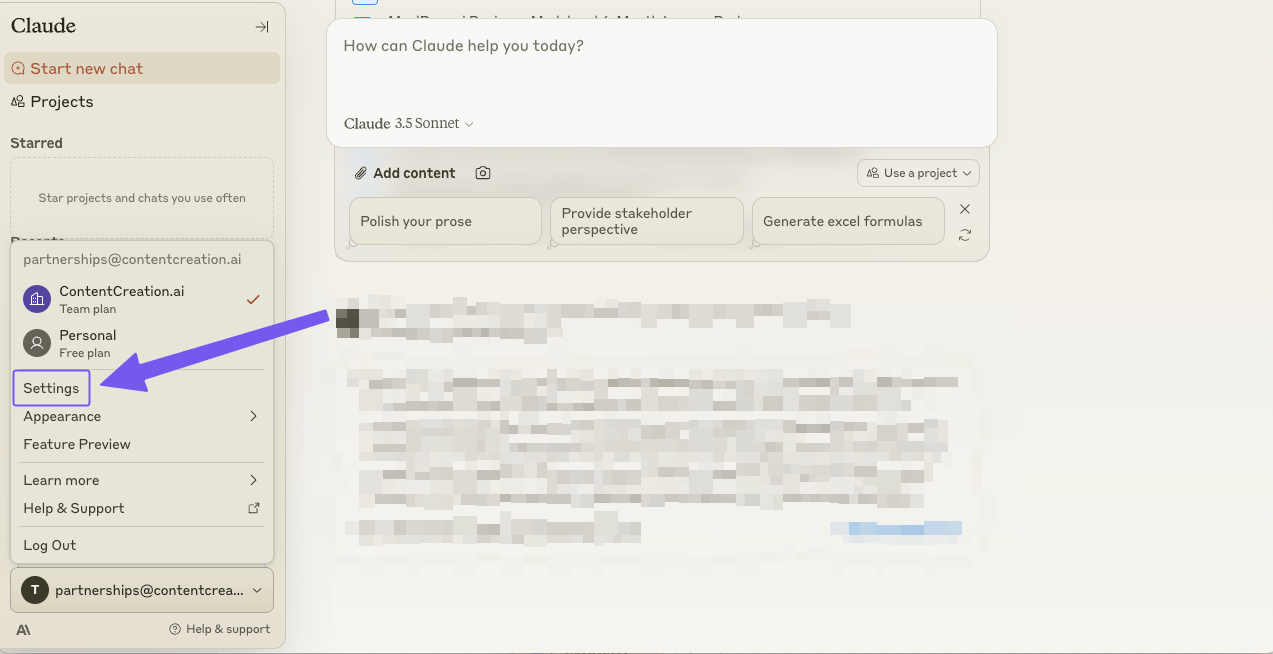 Ensure to enable artifacts
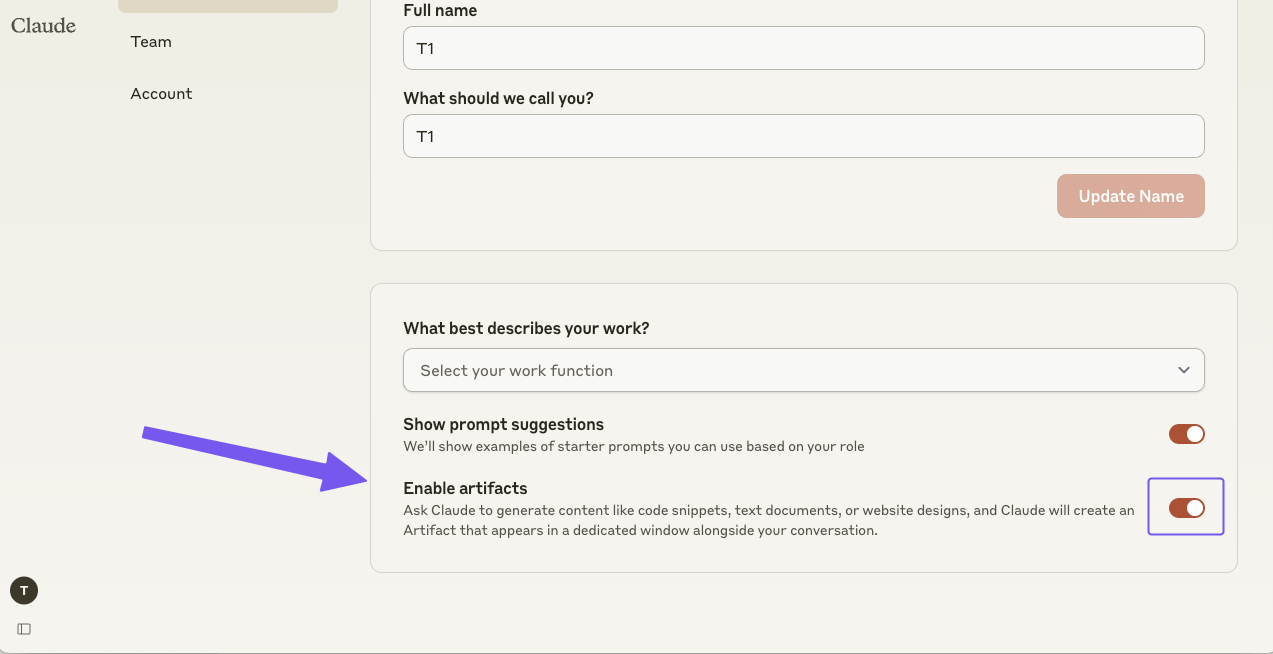 Toggle Artifacts On7) Master the Interface: The main workspace is where the magic happens. Its just like the regular chat window you may be familiar with, but it is where you interact with your Claude Project, refine prompts (and custom instructions), and watch as it starts delivering the insights you need. The conversation interface is where you can interact with Claude, ask questions, and issue commands. If you need to add or update content, the context panel on the side to reference uploaded documents or previous conversations.
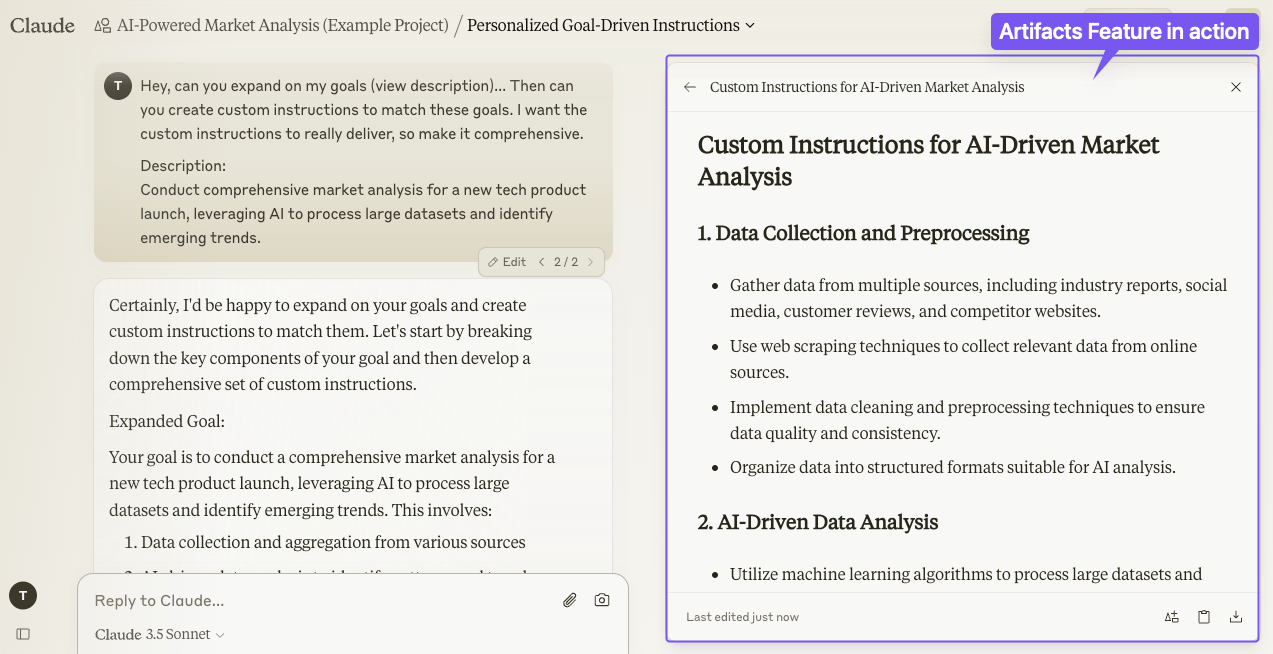 Artifacts in aNow you’ve got a fully-loaded Claude Project ready to take on your most ambitious goals.
Why Claude Projects is Criminally UnderratedWhile the rest of the world is talking about ChatGPT and Custom GPTs, Claude is the hidden gem that’s about to leave everyone in the dust. Here’s why Claude projects is the most underrated AI tool in the game:
Here’s the cold, hard truth: Claude isn’t underrated because it’s inferior. It’s underrated because most people just don’t have time to thoroughly test all the new tools and features on the market.
While the masses focus on ChatGPT wrappers (Jasper, Poe, Copy.ai, etc.) or custom GPTs, forward-thinking players are leveraging Claude 3.5 Sonnet and especially Claude Projects to transform their industries and overcome business challenges. In my opinion, it’s a significant competitive edge. After integrating it into my business, I can honestly say it’s been transformative (and I don’t typically exaggerate about AI tools). ChatGPT will likely catch up soon, but Anthropic may push the boundaries even further with their next innovation. It’s an exciting race in AI development, and I’m not particularly loyal to any brand. What truly counts is which company delivers the most powerful and practical tools for getting the job done.So, are you happy with following the herd, or are you ready to use AI tools that can really push your life or business further? Claude isn’t just the future of AI; it’s the present cutting edge for innovators who dare to explore.
Real-World Scenarios: Claude Projects Potential Use Cases Claude Projects is revolutionizing various industries with its versatility and efficiency. Here’s how it’s crushing it across different domains:
Claude Projects: Your AI Powerhouse for Personal and Business DominationThe AI revolution isn’t coming – it’s here. But many of you may be wondering how you can use Claude projects effectively or for what use case? Let’s break down some potential powerful use cases across personal and business domains:
Personal Power-upsCooking & Creativity:
Learning & Development:
DIY Web Development:
Business DominationSoftware Development on Steroids:
Research & Analysis that Kills:
Content Creation Factory:
Training & Operational Excellence:
These scenarios showcase how Claude Projects is not just participating in these industries – it’s dominating them. It’s enhancing productivity, fostering creativity, and providing personalized solutions that are changing the game across sectors.
The Ethical Edge: Leading with Integrity in the AI AgeClaude is one of the more ethically centered AIs out there. That is one thing they are known for. However, some responses or reasoning may lean toward a certain bias or have other issues, due to the robust “guardrails” Anthropic has integrated into Claude.Beyond Claude’s built-in robust ‘ethical’ nature, you can also embed your company’s ethical guidelines. You can set up custom ethical frameworks that guide Claude, ensuring every decision or response aligns with your values.
Example Ethical Prompt: “Claude, before finalizing this marketing strategy, run it through our ethical consideration checklist and flag any potential issues related to inclusivity or unintended bias.”
Conclusion: Your Gateway to AI-Powered Business TransformationLet’s be clear—Claude Projects isn’t just another AI tool in a crowded market. It’s a paradigm-shifting platform that’s reshaping how businesses approach AI integration. Here’s why you need to seriously consider Claude Projects:
So, what’s your next move?
Remember, in the rapidly evolving world of AI, innovation is key to staying competitive (read the Innovators Dilemma if you haven’t). Claude Projects is your ticket to being at the forefront of this new paradigm of business. Seize this opportunity to revolutionize your business and your approach to AI adoption.
The present is already AI-driven, and the future even more so—with Claude Projects, your business isn’t just prepared for tomorrow, it’s actively shaping it. The time to act is now. Are you ready to lead the charge?